Brat & Brat White
Black brat text on brat green, or black text on white for the remix-cover look.
Type your text and the brat generator turns it into the lime-green, lowercase brat look as you type. Add a soft blur with the Blur Effect slider. Switch to Brat White, black, pink or your own colours, then download a PNG, JPG or WebP: free, no sign-up and no watermark. For something specific, use the brat font generator, meme maker, album cover generator or lyrics video generator.
A Brat generator turns a word or phrase into a graphic inspired by the lime-green, lowercase, slightly blurred visual style associated with Charli XCX’s Brat album. Type your text, choose colours, adjust the blur and spacing, and watch the result update immediately.
This free brat maker runs in your browser with no signup and no watermark. The design canvas is processed locally, so your text and generated image do not need to be uploaded to a server. Not sure which tool fits the job? The Brat tool chooser compares the text, font, meme, image, video and album-cover workflows.
Brat Text
The editor at the top of this page is a brat text generator: whatever you type becomes brat text straight away, ready to copy or download. Pick a style tab to start, then adjust the colour, blur and spacing. For long lines or song lyrics, turn on Wrap Long Text, and Auto Fit Text keeps every word inside the canvas. It works just as well as a brat word or type generator: type a single word or your name and download it in brat lettering.
Black brat text on brat green, or black text on white for the remix-cover look.
Sweat flips the colours to brat-green text on black. Neon uses bright cyan Impact lettering on black.
Scribble adds a hand-drawn scribble, Album uses heavier blurred lettering, and Gradient adds a colour gradient behind the text.
Step-by-Step Tutorial
Type the wording first, style it in the live preview, then choose the canvas and export settings once the text reads clearly.
Step 1
Start with the exact word or phrase you want on the design. The generator updates the preview while you type, so this is the best moment to test whether the wording feels balanced before changing visual settings.
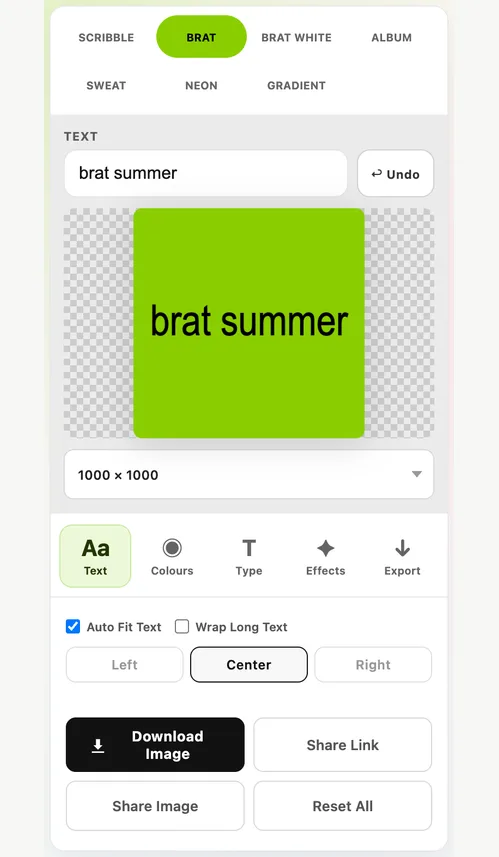
Step 2
Next choose the visual starting point. You can use the built-in style tabs, pick a colour swatch, or use the background and text colour controls for a custom combination.
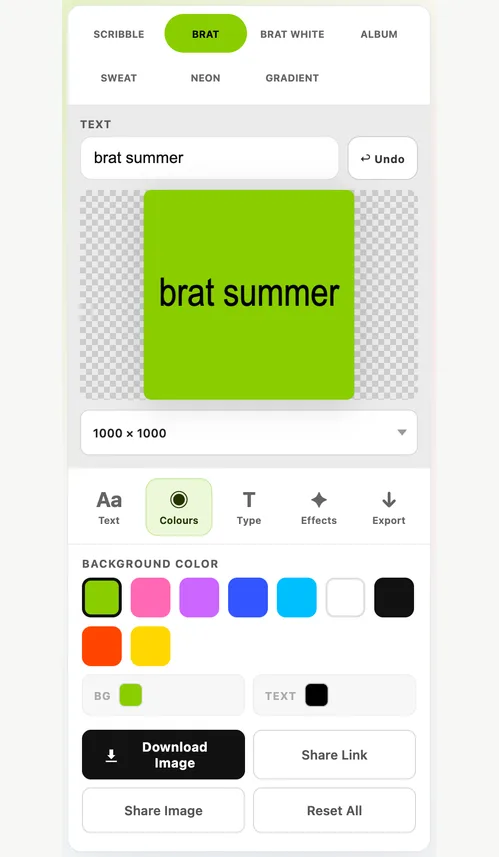
Step 3
Once the basic look is right, use the detailed controls to shape the text. Small adjustments here can make the same phrase feel cleaner, rougher, louder or more experimental.
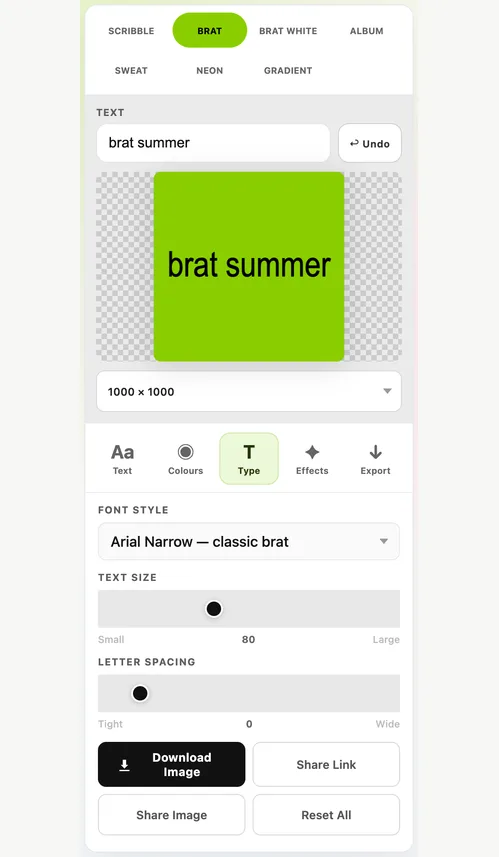
Step 4
Finish by matching the canvas to where the graphic will be used, then either copy the result or download the finished image from the generator.
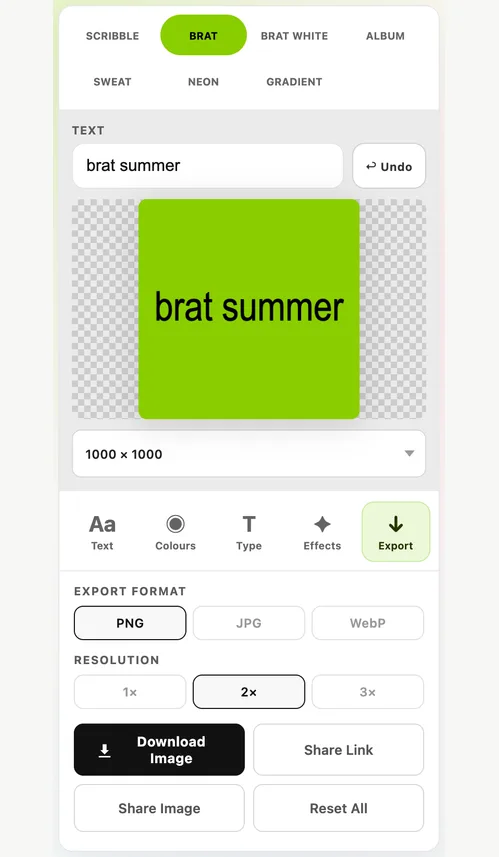
Typography, visual treatment and export settings are the controls that change the final result most.
Typography
The generator is built around text, so the most useful controls are the ones that shape how the phrase fits and how quickly it can be read.
Styles
Use the style tabs for fast starting points, then refine the result with swatches, custom colours and optional effects instead of treating every design as the same green card.
Output
The last step is about destination. Choose the base canvas, pick 1×, 2× or 3× resolution, then copy, share or download the result.
Key Features
The controls below are the ones that materially change the design, text fit, sharing or final export.
Every change appears immediately, so you can judge the text, colours, blur and spacing before exporting.
Start with Brat Green, white, black, pink or blue, then use the colour pickers when you need your own background and text combination.
Use Auto Fit Text to keep long wording inside the canvas or Wrap Long Text to split it across lines, then refine the typeface only as needed.
Choose 800×800, 1000×1000 and 1200×1200 square; 1080×1350 portrait; 1080×1920 Story; 1920×1080 wide; and 1200×630 banner, then export at 1×, 2× or 3× the base size.
Share Link now keeps the text, colours, font, size, spacing, blur, alignment, effects, canvas and text-fitting settings so someone else can reopen the same setup.
Copy the rendered PNG or download PNG, JPG or WebP without a Brat Generator watermark. No account is required.
Styles
Brat green (#8ACE00) is the classic, and Brat White gives you the white background with black text from the remix cover. Black, pink, blue and custom colours use the same condensed, slightly blurred treatment. Tap a colour to open the generator in that style, or compare more combinations in the brat colours guide.
Content Ideas
Brat-style typography can work across personal artwork, memes, playlists, profile graphics and social posts.
Use the Brat Album Cover Generator for fan-made cover concepts, playlist artwork, artist names, moods, and inside jokes in a familiar Brat-inspired layout.
Use the tool as a lightweight Brat meme generator for reactions, one-liners, TikTok thumbnails, Instagram Stories, or X posts.
Make WhatsApp brat stickers, anomali brat text, profile pictures, phone wallpapers and Discord banners.
Switch export sizes while keeping the same visual treatment for Instagram, TikTok, playlists, banners, and other creative projects.
More Tools
Each tool focuses on a different job, so open the one that matches what you want to make.
Find out what font brat uses and type in the brat font look, with spacing, blur, colour and transparent PNG export.
Open Font GeneratorTurn song lyrics or any text into an animated brat video with optional audio, then export a video, GIF or frames.
Open Lyrics Video GeneratorMake brat memes with photo upload, top and bottom text, effects and image export.
Open Meme GeneratorCreate square brat album and playlist covers with title, artist line and high-resolution export.
Open Album Cover GeneratorBuild text-led brat graphics with optional background images, font and blur controls, simple effects and five canvas sizes.
Open Image GeneratorOpen the generator in Brat White: black text on white, or switch to white text on black.
Open Brat WhiteTurn brat text into a 512×512 WhatsApp sticker in one tap, with steps to add it in WhatsApp.
Make a StickerTap Tung Tung Tung Sahur, Tralalero Tralala and other anomali names to make them brat text.
Open Anomali IdeasCompare brat green, white, black, pink, blue and custom colour combinations before you create.
Explore Brat ColoursBackground
The visual language moved far beyond the original cover; Collins Dictionary’s 2024 Word of the Year coverage is one clear marker of how widely “brat” entered everyday culture.
Charli XCX released her sixth studio album, Brat, on 7 June 2024. Its stripped-back cover quickly became a recognisable visual reference across music and social media.
The bright green field, blurred lowercase typography, and deliberately imperfect finish stood out because it rejected the polished look of conventional album artwork.
Brat Summer spread into fashion, language, memes, and internet culture. Collins Dictionary later chose “brat” as its Word of the Year for 2024.
FAQ
Clear answers to the most common Brat Generator questions. If you run into a download, blur, text-fitting or browser issue, the Common Problems & Quick Fixes guide covers the practical fixes.
It is a browser-based design tool that recreates the visual language associated with Charli XCX’s 2024 Brat era: flat colour, condensed lowercase text, and a soft blur. You can replace the text, colours, size, and export format.
A brat text generator turns any word or phrase into text in the brat album style: lowercase, condensed, slightly blurred and usually black on lime green. The generator at the top of this page is one. Type your text, pick a style such as Brat or Brat White, and download it as a PNG, JPG or WebP.
Yes. This tool is free to use, does not require an account, and does not add a watermark to the exported image.
Choose the Brat White style at the top of the generator. It switches to a white background with black text, the look used on the white Brat remix cover. For white text instead, pick the black swatch as the background and white as the text colour.
The exact source typeface is debated. Arial Narrow and similar condensed sans-serif fonts are useful approximations, but the Brat look also depends on sizing, spacing, distortion and blur.
#8ACE00 is a widely used digital approximation for the lime-green Brat look and is the default preset in this generator. Screen rendering can vary, so treat it as a practical web colour rather than a guaranteed physical colour match.
Enter your text, choose the background and text colours, adjust blur, size, and spacing, pick a canvas size and export format, then download the finished image.
Yes. The Brat Lyrics Video Generator animates your lyrics or any text in the brat style, can add an audio track, and exports a video, GIF or individual frames.
No. AI image tools guess at a picture from a prompt, but this generator sets exactly the words you type in the brat style. The result is instant, predictable and free, and the image is drawn in your browser.
No separate app is required. The generator runs in modern mobile and desktop browsers.
This is a fan-made tool, not legal advice. Personal creative use is generally different from selling merchandise or advertising with protected names, branding, or artwork. For commercial use, consider the applicable copyright and trademark rules in your jurisdiction.
Yes. The controls are responsive and work on modern phone and tablet browsers as well as desktop computers.
The generator renders the preview and export in your browser and does not upload your text or image to a server. The one exception is your choice: Share Link puts the text and settings into the link itself, so anyone you send it to can read them.
No. Brat Generator is an independent fan-made design tool inspired by the Brat aesthetic and is not affiliated with Charli XCX, Atlantic Records, or Warner Music.
Ready to create?
Free, browser-based, no sign-up, and no watermark on your exported design.
Start Creating